One of the things I recently implemented in my side project was adding JSON-LD structured data to improve SEO. It has significantly enhanced the way search engines and AI understand my content, resulting in improved visibility and higher click-through rates.
Ideally, when you write semantic HTML, it helps search engines understand the content better. Adding JSON-LD maps different entities and relationships in a more structured way.
What is JSON-LD?
JSON-LD is a lightweight linked data format that uses JSON to represent linked data. It's easy to read and write for both humans and machines.
<script type="application/ld+json">
{
  "@context": "https://schema.org",
  "@type": "Article",
  "headline": "Implementing JSON-LD in Next.js for Better SEO",
  "author": {
    "@type": "Person",
    "name": "Aakash Patel"
  },
  "datePublished": "2025-09-10",
  "publisher": {
    "@type": "Organization",
    "name": "My Blog",
    "logo": {
      "@type": "ImageObject",
      "url": "https://example.com/logo.png"
    }
  }
}
</script>
This is an example of JSON-LD markup for an article you are reading right now. Basically, it now gives more context to search engines about the content and how entities and relationships are structured.
Here, @type defines the type of content, such as Article, Person, or Organization. The @context specifies the schema vocabulary being used, which is usually https://schema.org.
You must try to include as much relevant information as possible, such as author details, publication date, and publisher information.
Why Use JSON-LD for SEO and AI?
For example, you publish an amazing product page or blog post. Without structured data, Google sees text and images, nothing more.
With JSON-LD, suddenly Google understands this is a product with a price, availability, and reviews. Or it recognizes your article's author, publication date, and main entity.
The results speak for themselves. I've seen click-through rates jump by 30% just from rich snippets enabled by proper JSON-LD implementation.
Those star ratings in search results? The price tags? The FAQ dropdowns? All powered by structured data. And in Next.js, you can generate all of this dynamically based on your content.
But here's what really sold me: JSON-LD future-proofs your content. How?
As search engines get smarter and voice search becomes dominant, structured data becomes the bridge between your content and whatever new interfaces emerge. It's not just about today's SERP features; it's about being ready for whatever comes next.
How to Implement JSON-LD in Next.js Projects?
Implementing JSON-LD in Next.js is straightforward. You can define them as a <script> tag in your layout.js or page.js files.
Here’s a simple example of how to add JSON-LD in a Next.js page component:
export default async function Page({ params }) {
  const { id } = await params;
  const product = await getProduct(id);

  const jsonLd = {
    '@context': 'https://schema.org',
    '@type': 'Product',
    name: product.name,
    image: product.image,
    description: product.description,
    sku: product.sku,
    brand: {
      '@type': 'Brand',
      name: product.brand,
    },
    offers: {
      '@type': 'Offer',
      url: `https://example.com/products/${product.id}`,
      priceCurrency: 'USD',
      price: product.price,
      availability: 'https://schema.org/InStock',
      itemCondition: 'https://schema.org/NewCondition',
    },
  };

  return (
    <section>
      {/* Add JSON-LD to your page */}
      <script
        type="application/ld+json"
        dangerouslySetInnerHTML={{
          __html: JSON.stringify(jsonLd).replace(</g, '\\u003c'),
        }}
      />
      {/* ... */}
    </section>
  );
}
If you are using Typescript, then you can use a community package like schema-dts to get type safety while defining JSON-LD.
npm install schema-dts
The schema-dts package provides TypeScript definitions for Schema.org vocabularies. Trust me, having autocomplete for schema properties saves hours of documentation diving. If you're not using TypeScript (though you really should be), you can skip this and work with plain objects.
Building a Base Schema Component
The foundation of my JSON-LD implementation always starts with a base component that handles the rendering logic. Here's what I've refined over dozens of projects:
import { FC } from 'react':
interface JsonLdProps {
  data: Record<string, any>;

}
export const JsonLd: FC<JsonLdProps> = ({ data }) => {
  return (
      <script
        type="application/ld+json"
        dangerouslySetInnerHTML={{
          __html: JSON.stringify(data).replace(</g, '\\u003c'),
      }}
      />
  )
}
Here, JSON.stringify does not sanitize the data by default, so you need to manually escape certain characters to prevent XSS vulnerabilities.
To prevent this type of vulnerability, you can scrub HTML tags from the JSON-LD payload, for example, by replacing the character, <, with its Unicode equivalent, \u003c.
I've learned to always sanitize the data before stringifying; one stray HTML tag in your product description can break the entire schema.
For TypeScript projects, you can enhance the JsonLd component to accept typed data using schema-dts. By using the schema-dts types, you catch schema errors at compile time instead of discovering them in Google's testing tools weeks later:
import { Article, WithContext } from 'schema-dts':

export function createArticleSchema(
    title: string,
    description: string,
    authorName: string,
    publishDate: string
): WithContext<Article> {
    return {
        '@context': 'https://schema.org',
        '@type': 'Article',
        headline: title,
        description,
        author: {
            '@type': 'Person',
            name: authorName,
        },
        datePublished: publishDate,
        publisher: {
            '@type': 'Organization',
            name: process.env.SITE_NAME,
        },
    };
}
The WithContext wrapper ensures you're including the required @context field, something I've forgotten more times than I'd like to admit. TypeScript won't let you forget.
Other Types of Schemas
Product and E-commerce Schema
const productSchema = {
    '@context': 'https://schema.org',
    '@type': 'Product',
    name: product.name,
    description: product.description,
    image: product.images,
    sku: product.sku,
    offers: {
        '@type': 'Offer',
        price: product.price,
        priceCurrency: 'USD',
        availability: product.inStock
            ? 'https://schema.org/InStock'
            : 'https://schema.org/OutOfStock',
        seller: {
            '@type': 'Organization',
            name: 'Your Store Name',
        },
    },
    aggregateRating: product.reviews?.length > 0 ? {
        '@type': 'AggregateRating',
        ratingValue: product.averageRating,
        reviewCount: product.reviews.length,
    } : undefined,
}:
FAQ Schema
This is my favourite one for blog posts. It can help your content get those nice FAQ rich snippets in search results.
const faqSchema = {
    '@context': 'https://schema.org',
    '@type': 'FAQPage',
    mainEntity: faqs.map((faq) => ({
        '@type': 'Question',
        name: faq.question,
        acceptedAnswer: {
            '@type': 'Answer',
            text: faq.answer,
        },
    })),
}:
Dynamic Generation of JSON-LD Schemas:
When your structured data depends on dynamic content, getServerSideProps is your best friend. I use this approach for user-generated content or frequently updated data:
export const getServerSideProps: GetServerSideProps = async ({ params }) => {
    const product = await fetchProduct(params.id):
    const jsonLd = {
        '@context': 'https://schema.org',
        '@type': 'Product',
        name: product.name,
        description: product.description,
        // ... rest of schema
    };

    return {
        props: {
            product,
            jsonLd,
        },
    };
};
Then, in your component, you simply pass this to your JsonLd component. The catch? Search engines see fully rendered structured data on the first paint, no JavaScript execution required.
Static Generation with getStaticProps:
For content that doesn't change often (like blog posts or product catalogs), static generation gives you the best performance:
export const getStaticProps: GetStaticProps = async ({ params }) => {
    const post = await getPostBySlug(params.slug):
    const articleSchema = createArticleSchema(
        post.title,
        post.excerpt,
        post.author,
        post.publishedAt
    ):
    return {
        props: {
            post,
            articleSchema,
        },
        revalidate: 3600, // Revalidate every hour
    };

}:
I always use ISR (Incremental Static Regeneration) with a reasonable revalidation time. This keeps your structured data fresh without sacrificing performance. One gotcha I learned the hard way: always test your schemas after deployment. Development URLs differ from production, and absolute URLs in structured data must match your live site.
Testing and Validation
Using Google's Rich Results Test
Google's Rich Results Test is my go-to validation tool, but here's the thing, don't just paste your JSON-LD and call it a day.
You should test your actual deployed pages. I can't count how many times I've seen perfect JSON-LD in development fail in production because of URL mismatches or missing environment variables.
Here's my testing workflow:
-
Deploy to a staging environment
-
Test the full URL in Rich Results Test
-
Check for both errors AND warnings
-
Click through each detected item to verify the data
One trick I've learned: Google's test tool shows you exactly how your content will appear in search results. If something looks off there, it'll look off in actual SERPs.
Using Schema.org Validator
Schema.org's validator is another excellent resource. It provides detailed feedback on your structured data's compliance with Schema.org standards.
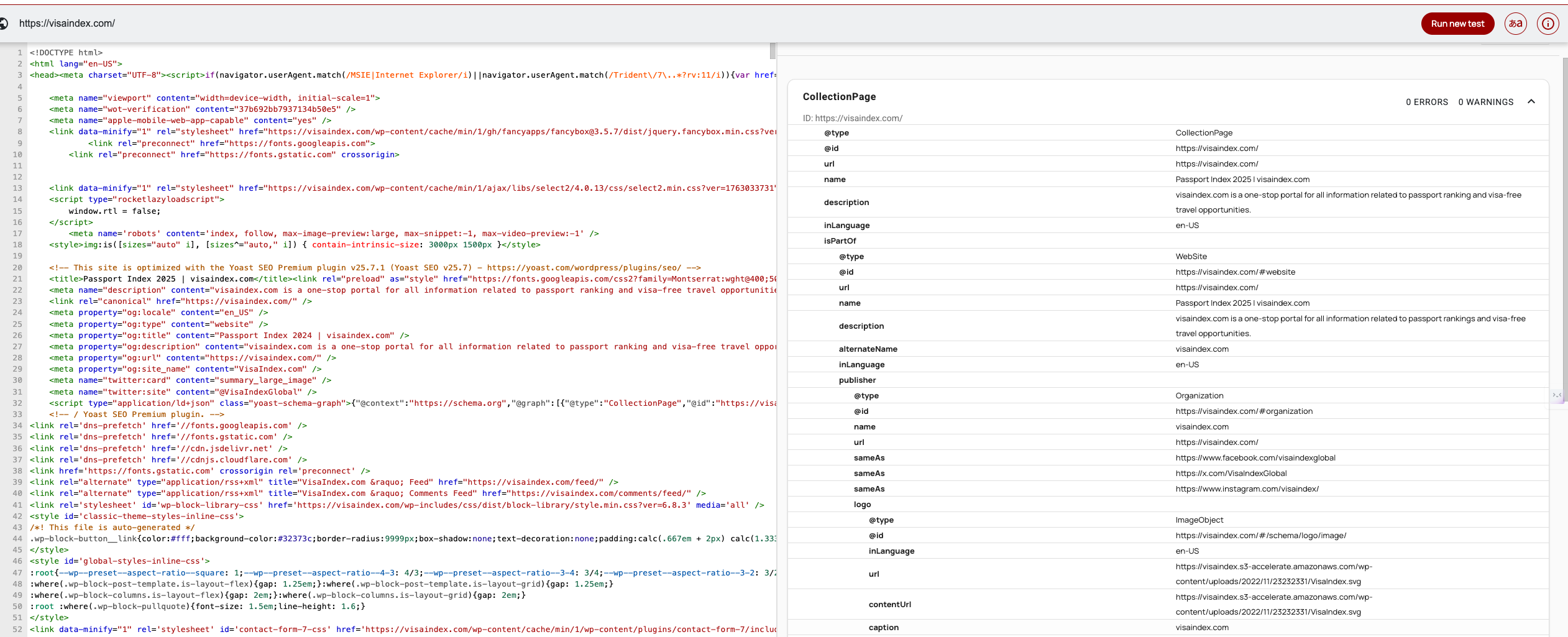
Here's the link: Schema Validator
Just like with Google's tool, always validate your live URLs. The schema.org validator can catch issues that Google's tool might overlook, especially for less common schema types.
Frequently Asked Questions
What is JSON-LD and why is it important for Next.js SEO?
JSON-LD (JavaScript Object Notation for Linked Data) is a structured data format that helps search engines understand your content better. Next.js enables rich snippets, improves click-through rates by up to 30%, and future-proofs your content for voice search and emerging interfaces.JSON-LD (JavaScript Object Notation for Linked Data) is a structured data format that helps search engines understand your content better. Next.js enables rich snippets, improves click-through rates by up to 30%, and future-proofs your content for voice search and emerging interfaces.
How do I add JSON-LD schema to a Next.js page?
Create a reusable JsonLd component using dangerouslySetInnerHTML to render the schema in a script tag. Then generate your structured data in getServerSideProps or getStaticProps and pass it to the component, ensuring search engines see fully rendered schemas on first paint.
What are the most important schema types for Next.js websites?
The essential schemas include Article/BlogPosting for content sites, Product schema for e-commerce (with pricing and availability), and Organization schema for your homepage. Each type enables specific rich results like star ratings, price tags, and FAQ dropdowns in search results.
Can I use TypeScript for type-safe JSON-LD implementation?
Yes, using the schema-dts package provides TypeScript definitions for Schema.org vocabularies. This enables autocomplete for schema properties and catches errors at compile time, preventing broken schemas from reaching production and ensuring proper structured data validation.
How often should I update JSON-LD schemas in production?
Update your JSON-LD whenever content changes significantly or when Schema.org releases new properties. For dynamic contentage, use ISR (Incremental Static Regeneration) with reasonable revalidation times. Regular updates ensure your structured data stays current and maintains rich snippet eligibility.
What's the difference between JSON-LD and microdata for SEO?
JSON-LD lives in a separate script tag without affecting HTML structure, while microdata requires inline attributes mixed with your content. Google explicitly recommends JSON-LD because it's cleaner, doesn't interfere with React components, and is easier to maintain in modern JavaScript frameworks.